DHTML - HTML Document Object Model (DOM)


The DOM presents HTML as a tree-structure (a node tree), with elements, attributes, and text:
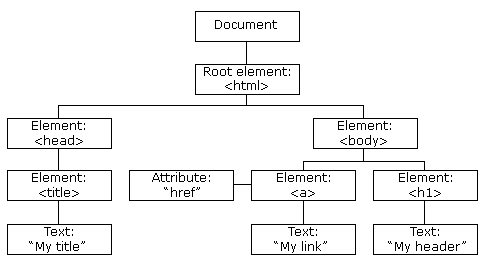
Examples
innerHTML
How to access and change the innerHTML of an element.
Attribute change
How to access an image element and change the "src" attribute.
What is the HTML DOM?
The HTML DOM is:
- A standard object model for HTML
- A standard programming interface for HTML
- Platform- and language-independent
- A W3C standard
The HTML DOM defines the objects and properties of all HTML elements, and the methods (interface) to access them.
In other words:
The HTML DOM is a standard for how to get, change, add, or delete HTML elements.
Using the HTML DOM to Change an HTML Element
The HTML DOM can be used to change the content of an HTML element:
<html> <body> <h1 id="header">Old Header</h1> <script type="text/javascript"> document.getElementById("header").innerHTML="New Header"; </script> </body> </html> |
HTML output:
New Header |
Example explained:
- The HTML document contains a header with id="header"
- The DOM is used to get the element with id="header"
- A JavaScript is used to change the HTML content (innerHTML)
Using the HTML DOM to Change an HTML Attribute
The HTML DOM can be used to change the attribute of an HTML element:
<html> <body> <img id="image" src="smiley.gif"> <script type="text/javascript"> document.getElementById("image").src="landscape.jpg"; </script> </body> </html> |
HTML output:
 |
Example explained:
- The HTML document loads with an image with id="image"
- The DOM is used to get the element with id="image"
- A JavaScript changes the src attribute from smiley.gif to landscape.jpg
More About the HTML DOM
If you want to study more about the HTML DOM, find the complete HTML DOM tutorial on our Home Page.


