JavaScript 1 : a script to create a breadcrumb trail. See it in action on this photo page (116 photos!). The script inserts the folder structure, with links, for the immediate page, so the viewer can see where they are, or backtrack.
JavaScript2: This is an example of a failed script; I can't get it to work! Click on the image, and what happens. See if you can help me: view the original instructions, the code, and my rendition (right click to view source code). As the developer says: "Divviewer Image viewer lets you display images inline- when the user clicks on a link- scaled to fit the dimensions of the page if necessary. This is very handy for very large images which may produce those unsightly browser scrollbars if not scaled. The sleek interface of the viewer can be customized, such as its padding, colors, the text (ie: the "X" button text), and more." Anyway, if you can figure this out, let me know!
JavaScript 3 : This is a script for Virtual Pagination. The documentation for the page is quite complex, but explains what the variables are in the script. I'm still working on this one! Here's the description: This script lets you transform long content on your page into a series of virtual pages, browseable via pagination links. The broken up content pieces are separated simply via arbitrary DIVs (or another block level element of your choice) with a shared class name. Pagination links are "semi automatically" created for the user to navigate to any "page" within the content easily. Watch out, pagination is no longer just a "between pages" affair thanks to this script! I got the text pages to work, but not the images. If you know how to fix this script, let me know...
JavaScript 4 : Here's an example of opening a new window and displaying an image, using Dreamweaver's Open New Window behavior. Here's another way of doing it: Check it out! What's the difference? The first script calls the function open_new_window() from inside a form, using the onclick mouse action. This version uses "javascript:open_new_window()" on a link.
JavaScript 5 : This is a really cool script - it builds a calendar! Just fill in the month and the year, and press the button, "Build". Presto - you have a calendar! The script itself needed very little adjustment, and mostly it was just a question of placing it properly on the page. Plus, it offered a really good way for me to keep track of what took place when!
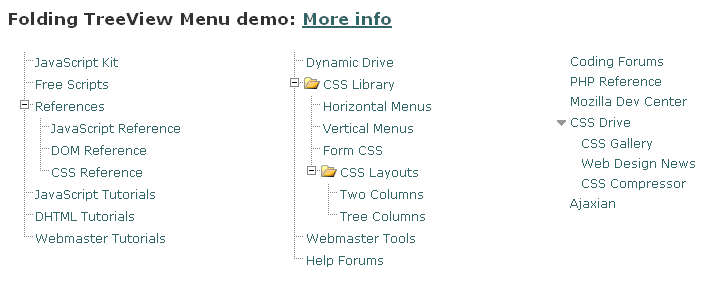
JavaScript 6 : This script was chosen because I liked it! It provides a menu that opens and closes manually to reveal, in this case, a treeview menu of my web's sitemap. It's much more visually satisfying that the Google Sitemap, which I didn't create because I don't want this website indexed! After much travail, I finally got this script to work. I placed the two sections inside a table so that it prints better. As an extra bonus, this page illustrates success with Javascript #7!
JavaScript 7 (Sorry, this apparently no longer works!): This one's just for fun - faviconicues adds the favicon for outside links that have one, and an external.gif for those that don't. This little tidbit created havoc with my CSS - I have a section set up with links that are displayed online, which meant that these favicons/external images ended up in the line below! I tried many other ways to re-style it, but eventually decided to change the class=capsule to be inline. Now I have to go back and re-style those paragraphs another way! Anyway, I like the little touch of class this gives the web site - it seems so magical, and I never understood how it worked. Now I know! The source for this script is ask the css guy. FOOTNOTE - after uploading, I find new problems. The script seems to conflict with coding that Yahoo inserts to collect site statistics. The icons are WAY too big (oh no, this no longer works either!), and the page loads incessantly. I could turn off site statistics, but it's a shame to lose that functionality. Hmm - have to reconsider this one... Plus, the original link no longer even works! However, check out JavaScript #6. It illustrates success with #7!