Resources
Google Images is a great place to find images. However, you should be aware that many of the pictures on Google Images are copyrighted. Even if they’re not identified as copyrighted, they still could be. For this assignment you don’t need to worry about copyright, but if you want to use an image for a project that you are going to profit from or distribute widely, you will need to get permission to use the image from the owner.
Creative Commons
If you want to use images that are not protected by traditional copyright, you could use pictures that are under a creative commons license. Owners of these images make them available to you for free, but under specific conditions. Usually, they want you to credit them for their work, and they don't want you to change their work significantly without permission. The specifics are up to each owner, so you should check what the conditions are.
click here to see a list of sites with creative commons licensed material
How to copy pictures
To copy an image from Google Images, don’t copy the little ‘thumbnail’ picture that is displayed on the Google Images search page.
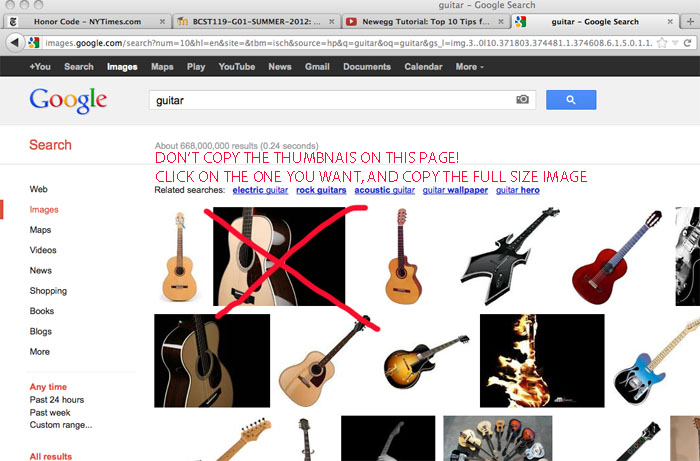
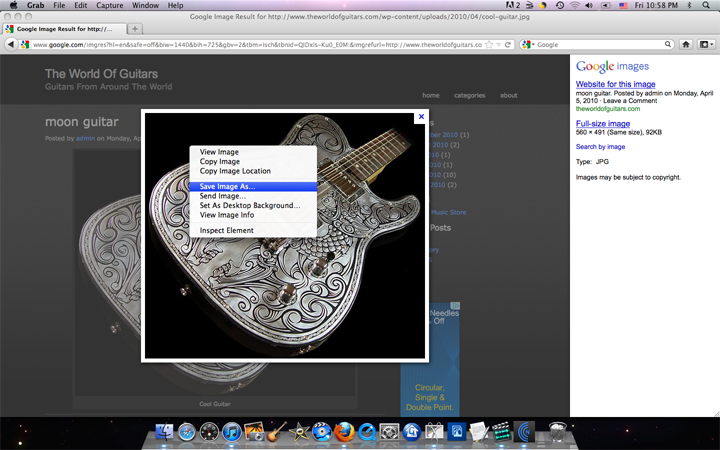
Instead, click on the thumbnail to open a full-sized version of the picture. Then you can copy the picture using your web browser, Firefox. Right click on the image (or control-click, if you are using a single button mouse) and a menu will pop up. Select Save Image As... and save it to your Pictures folder.
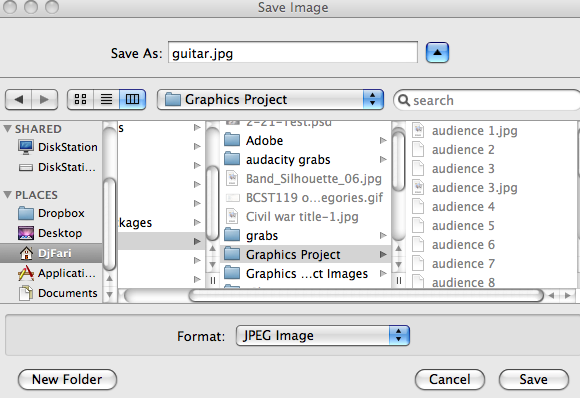
Since pictures on the web typically have uninformative names, you'll probably need to change the name of the picture so that you remember what you wanted it
If you can’t copy the image (or Save Image As...) it was probably protected by the author, and you should just choose a different picture that you can copy.