In this lecture we have established the following:
- every HTML element produces a rectangular element box
- the size of an element box is defined as:
the width property + padding + borders + margins
IE Windows 5.5, and lower, gets this wrong. It has its own definition for a box. This has been the bane of web developers for years!
IE 6 does implement the standards compliant box model, IF a legal DTD of XHTML Transitional or Strict is used in the document. In the absence of a proper DTD, IE 6 will revert back to Quirks Mode and does not properly implement the box model either!
How IE Win 5.5 Gets It Wrong
IE Windows 5.5 defines the width (and height) as equal to the dimensions of the visible elements of a box instead of just the content area of a box as is prescribed by the CSS standards. Below is
Roger Johansson's
 graphic illustration of the difference.
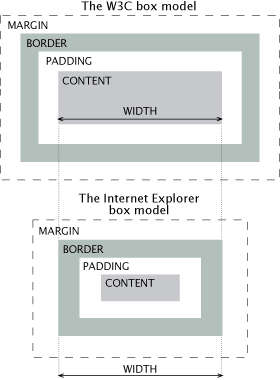
Here is some styling for a box:
div.text {
   width:   300px;
   padding: 30px;
   border:  20px;
   }
In a compliant browser this would work out to be:
300 (content/width) + 60 (padding) + 40 (border) = 400 pixels of space total
But IE Win 5.5 takes the CSS width value and then includes the size of padding and borders within that width value thereby squeezing the actual contents:
300 (specified width), minus 60 padding, minus 40 border = 200 pixels of space left for contents.
Needless to say, in a tight layout, 200 pixels of space is a large amount of difference and layout elements will probably not flow the same in different browsers. What a mess.
We will not be delving into hacks for these issues, but below I have provided a link to the most famous solution to this considerable problem created by Tantek Celik, a major force on the IE Mac team which did implement the box model correctly. I have also included a link to an excellent article by Roger Johansson who recommends that the best way to deal with the IE Box Model issue is to avoid it whenever possible, but he also includes several ways to deal with it if avoidance is not possible.
IE Browser Rendering
While I won't approach the "why", I do want to point out that IE6 renders box content-width problems differently that IE7 and other standards-compliant browsers. Earlier I demonstrated that applying the width property to nested element boxes could potentially make them stick out the side of their containing block under certain circumstances. Of course IE6 displays things differently!
When faced with nested boxes that are bigger than their containing block, IE6 will simply make the containing block bigger to fit around them! That might sound like a good idea until you start to think about the ramifications it has for pixel-perfect complex CSS page layouts. Oh what a mess it can make!
If you have IE6, use that browser to look at the
"Using the Box Model In Practice
 "
page. Notice that the third example, which should be sticking out the side of its containing block,
looks just fine. BUT... narrow the browser window and take a look at the top and bottom of the lecture page. IE makes the entire content area of the lecture page wider so that it no longer lines up with the header and footer. The width problem of one element box has now cascaded to affect nearly the whole page!
"
page. Notice that the third example, which should be sticking out the side of its containing block,
looks just fine. BUT... narrow the browser window and take a look at the top and bottom of the lecture page. IE makes the entire content area of the lecture page wider so that it no longer lines up with the header and footer. The width problem of one element box has now cascaded to affect nearly the whole page!
Fortunately, the 'fix' for too-wide nested boxes as outlined on the 'Using the Box Model In Practice; page works equally well for both standards-compliant browsers and for IE6. Either don't specify a width property for nested element boxes or be sure that their width - including margins, borders, padding and content width - all calculates to be equal to or less than the content width of the containing block.
This is also a good example of why it's important to check your web pages in various browsers!
Reference:
- Tantek's box model hack solution
.
- Article by Roger Johansson