AUTOSTRETCH COLUMN

It is a mystery! Why does one cell get so BIG
and another stays too small?
Well, only the web developer knows for sure!
THIS cell has text aligned to the RIGHT. Can you tell?

| 1 | 2 | 3 | 4 | 5 | 6 |
| 7 | 8 | 9 | 10 | ||
| 11 | 12 | 13 | 14 | 15 | |
| 16 | 17 | 18 | 19 | ||
| 20 | 21 | 22 | |||
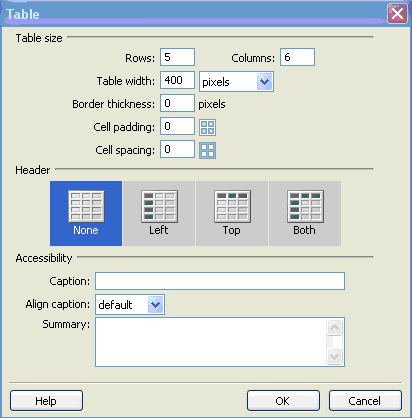
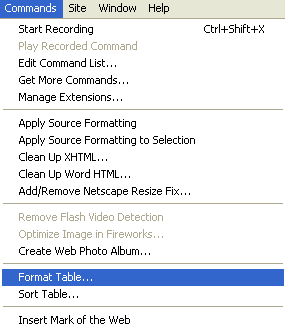
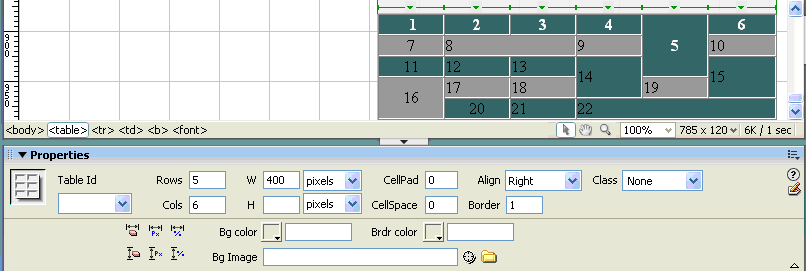
The process used to create this table:
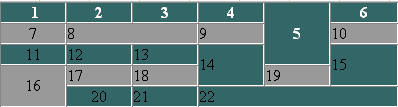
What does this tell us? The formatted table options must already be set up to center the left colum, and, indeed, to center the left-most cell in a row (otherwise, why would #20 be centered?). Another thing: #5 is in the top row (because the number 5 is bold, and in white font). This confirms the fact that cells are created left to right, and top to bottom. Finally, the default formatting of cells is to the left. All in all, an exercise well-worth the effort of doing it...
What attribute(s) did I change in the Format Table options to create this table: the color(s) of the alternating rows and the text in the top row.
By the way, here's the table again - I had to actually re-create it to be able to explain the exact process I took to make it! Just to balance the page, I've aligned the table to the right. I did this by selecting the table, this time by clicking the table tag (<table>) in the Tag Selector bar. Then, in the Properties Inspector, I changed the alighnment to Right.
| 1 | 2 | 3 | 4 | 5 | 6 |
| 7 | 8 | 9 | 10 | ||
| 11 | 12 | 13 | 14 | 15 | |
| 16 | 17 | 18 | 19 | ||
| 20 | 21 | 22 | |||
Return to the Sunset Table
LAY-OUT TABLES: a stretchable story of cells awry
AUTOSTRETCH COLUMN
|
The picutre on the left is 195px wide, and the cell width was only 150px wide, but it has been S-T-R-E-T-C-H-E-D! The cell is the actually the same width as the two below it. THIS cell is 200 px wide - and it stays that way! | It is a mystery! Why does one cell get so BIG and another stays too small? Well, only the web developer knows for sure! THIS cell has text aligned to the RIGHT. Can you tell? |
| |
|
These three tables were constructed all alike. Each table is 700 px wide. the cell widths, L to R, are 150, 200, 350. So - everything else is illusion - the magic of the auto-stretch! |
AUTOSTRETCH COLUMN
I wonder if I can fill this column with text? Since it stetches, I may never know! I won't know what YOU see when you look at this web page, only what MY web browser shows. And, who knows, maybe your view of this is better than mine. As I write this, the cell keeps getting longer and longer, but not wider and wider. Hmmm, why is that? This is certainly an eye-opener! |
Sunday, October 29, 2006 5:35 PM
This is the time this page was last saved. At least, that's what I THINK the inserted date means! |
| |
This cell should have a GIRAFFE in it! |
Now THIS autostretch column on your right is VERY peculiar. The height of all these tables is the same, yet this table appears so much taller! It has stretched UP instead of out! How can that be? It's a mystery... By the way, these cells have no padding and no spacing. What do you think? |
AUTOSTRETCH COLUMN
This rollover used to work. Why doesn't it now? Oops - now it works. Why? |
| |
Return to the Sunset Table