Build Your Dream Machine
You have learned quite a lot about the personal computer and its components. Now it’s time to put that knowledge to good use. Imagine that you have an unlimited budget and you can order a system with any components that you desire. Since you’re a budding digital media pro, you’ll want to get a desktop system, not a laptop. This assignment asks you to use the internet to locate the hardware components of your choice and assemble them into your dream machine!
Requirements
The assignment is due on Sunday 9/15 by 11:55p. This is a multimedia assignment, so you are going to make a document that combines text and pictures to describe your dream system. When you have finished making your document, you should send it to me by clicking on the link below and ‘uploading’ the file to the server. Then I’ll ‘download’ the file to my computer and read it. If sending a document through Insight is new to you, please read the tutorials available publicly on our site homepage under the Main Menu (top left): http://insight.ccsf.edu
There is no set length for this assignment; the document should be as long as necessary for you to cover all of the required components and any other components that you would like to include.
What is the purpose of your system?
Before you begin, be sure that you have a definite purpose in mind for your system. For example, if your dream system will be used only for basic word processing, would you need to spend your money on the fastest processor, largest hard drive, or most expensive high definition monitor? On the other hand, if you are into video editing or audio production, you will need different components that are more complex and costly.
Required components
Here is a list of the basic types of computer components. Your dream system should have at least one of each of these components, so consider this a list of ‘required’ components for the assignment. If you want to add more things to your system (… a flamethrower, for instance) feel free!
- CPU
- Motherboard (has to fit the case)
- Case and power supply (what wattage is necessary?)
- RAM
- Hard Drive (or SSD)
- Video Card
- Sound Card or external audio interface
- Optical Drive (BluRay/DVD/CD-ROM)
- Connections (USB 3.0, FireWire, Thunderbolt, etc.)
- and any other fun peripherals that you think you'll need: headphones and/or audio monitors? a special mouse? A USB Keyboard if you want to make music?
Using the internet, you should search for each component that’s on the list, and find a specific model that fits your dream machine. For example, if you are creating a system for advanced video editing, you might want to use an Intel i7 CPU, which is a very powerful central processing unit.
If you're buying a Mac, you won't be picking and choosing your components from outside sources. But you can still tell us about how your dream Mac will be configured by Apple. Just find out what components are available as options and upgrades from the Apple website and search their picture on the internet. And be sure to tell us why you chose that particular configuration!
To find out more about the components you can read about them in the course Reader and on Wikipedia, or consult other websites. Recommendations about systems and components can usually be found at sites that serve computer builders, like Newegg.com.
Writing It
Open a document in your word processor and Save it. Write a short introduction that says what the purpose of your system is (gaming, word processing etc.).
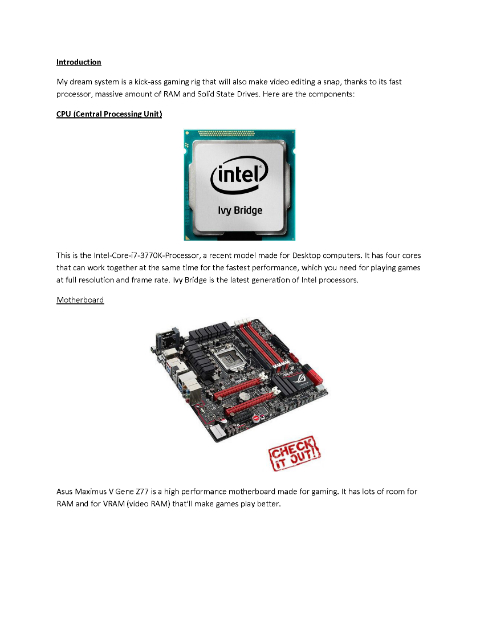 Then, Copy and Paste a picture of the component that you have chosen into the document. Underneath the picture, type the component name and a line or two about why this component fits your system. Then move on to the next component and continue until you have a picture and a description of all the components in your system.
 Resources
Google Images is a great place to find images. However, you should be aware that many of the pictures on Google Images are copyrighted. Even if they’re not identified as copyrighted, they still could be. For this assignment you don’t need to worry about copyright, but if you want to use an image for a project that you are going to profit from or distribute widely, you will need to get permission to use the image from the owner.
If you want to use images that are not protected by traditional copyright, you could use pictures that are under a creative commons license. Owners of these images make them available to you for free, but under specific conditions. Usually, they want you to credit them for their work, and they don't want you to change their work significantly without permission. The specifics are up to each owner, so you should check what the conditions are.
click here to see a list of sites with creative commons licensed material
How to copy pictures
To copy an image from Google Images, don’t copy the little ‘thumbnail’ picture that is displayed on the Google Images search page. Instead, click on the thumbnail to open a full-sized version of the picture. Then you can copy the picture using your web browser, Firefox. Right click on the image (or command-click, if you are using a single button mouse) and a menu will pop up. Select Save Image As... and save it to your Pictures folder. Since pictures on the web typically have uninformative names, you'll probably need to change the name of the picture so that you remember what you wanted it for.
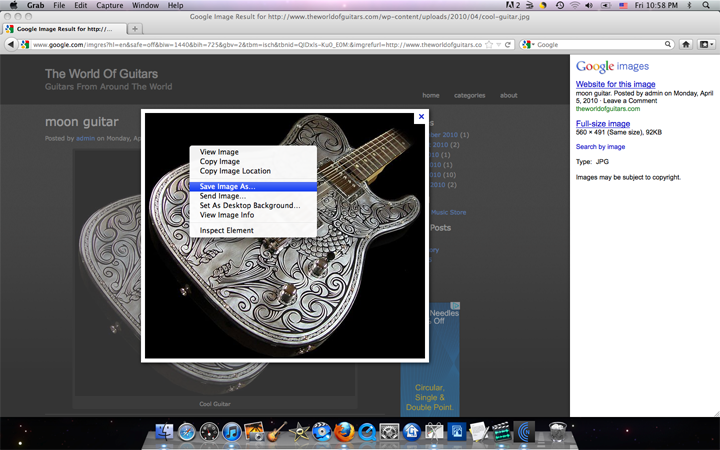
If you can’t copy the image (or Save Image As...) it was probably protected by the author, and you should just choose a different picture that you can copy.