


|
|
|
|
|
|
|
|
Martha's COIN 74 Week 7 Exercises
Day Six -Customized Form Elements
Here's a radio group I created, just for practice. Don;t expect it to do anything, or go anywhere!
You have not yet learned to create classes for Cascading Style Sheets, but for those who do (and you all will after lessons 10 and 11), you can simply select a defined class from the Class dropdown menu and apply it to any form element or the entire form.... ...the Class does not display in the Document Window. You have to preview in browser to see the Class for the Textarea.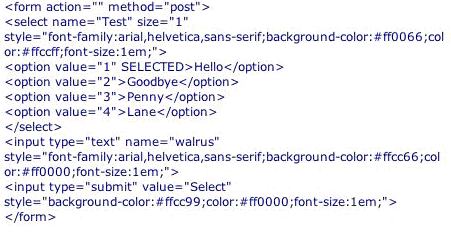 View the Source Code of my form and change the parameters I used to customize some form elements in your homework sample. Make yours with different font, different background colors, etc. Different browsers display the form's CSS styling differently. In order for the styling to work on birth IE and Netscape, we have to use two external stylesheets, one for IE and one for Netscape. In doing so, you could adapt your font sizes, or background properties, or the other styles that NN4.xx can't interpret. To do that you can use the fact that NN 4.xx does not recognize the @import. Therefore you link two style sheets:
<link rel="stylesheet" href="StyleNN.css" type="text/css"> <style type="text/css"> @import url(Style.css); /*IE and NN6x styles*/</style>
I found this info on the Macromedia site...and tested it on my form, and it works great for both IE and Netscape. There are 3 types of CSS:
OK - now I think I'm ready to begin work on our assignment!
Page Created 11/12/06 Page Finished 11/13/06 Assignment Submitted 11/18/06
Document Last Modified:
© mjraup 2006
Webmaster