


|
|
|
|
|
|
|
|
Martha's COIN 74 Week 9 Exercises
Day Three - CSS Panels Part II
(continued from page 2) Take some time to experiment and play with all the possibilities in the Type and Background Categories. We won't use most of the other categories for this Intro course, but feel free to explore on your own if you want and report your findings to our group discussions. Once you have defined the Type and Background, select the OK button and create a list. You learned to create lists in earlier lessons. You simply select the ordered or unordered list button on the PI and start typing. Here's a sample of my list with the new style applied to the li tag...
Here is Martha's list
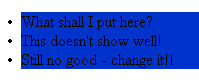
My experiment is not user friendly. ... [Martha's either!] I can simply edit the style by selecting the style selector in the CSS Styles Panel and clicking on the Edit Style...button on the bottom right of the CSS Styles Panel and this will open the CSS Style Definition for li window.
Here's Martha's second styles example:
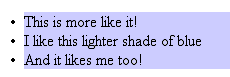
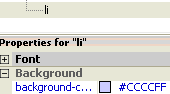
The following list displays the modified values for the list item style (of Martha's style). You can press the APPLY button to review the changes in real time instead of pressing the OK and then having to click the Edit Style...button to open the Style Definition window for each modification.
Take some time to assign style definitions to tags. When you redefine an HTML tag, it won't show up in your CSS Styles Panel and you don't have to select the tag and apply the code - DW applies it automatically. When you define a class, the class will show up in the CSS Styles Panel and you need to individually select anything to which you want to apply this class and then hit the name in the CSS panel. Classes don't display automatically. When you redefine an HTML tag, the style will NOT show in the CSS panel as ALL the html tag data gets the style applied automatically. When you create a .class, the class appears in the CSS panel and you have to individually apply it to any selection or tag.
Redefine the paragraph HTML tag by assigning a style to the P tag. Now all your paragraphs will display the style assigned by your redefined <p> tag. But what if you don't want all your paragraphs to reflect the same style? That's where a custom style or class is defined.
Martha's Redesigned Paragraph - with Georgia Font

Page Created 11/26/06 Assignment Submitted xx/xx/06
Document Last Modified:
© mjraup 2006
Webmaster